
A quiet place to color.
Follow the numbers, settle into the details, and make each artwork your own—without pressure, streaks, or timers.
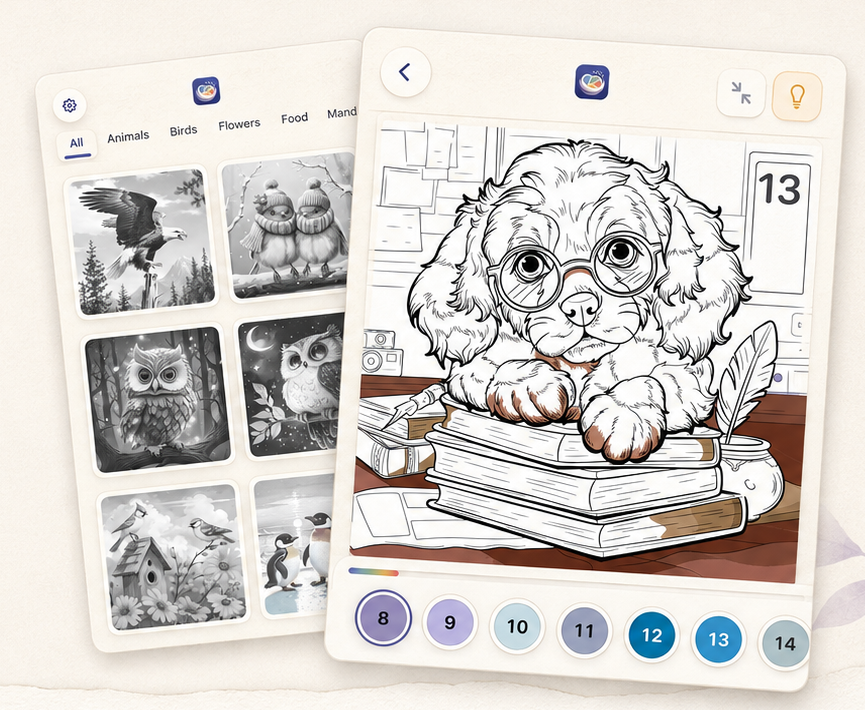
Color at your pace.
Choose an artwork, follow its numbered palette, and let HueNest save meaningful progress as you go.
- Browse the online library Find an artwork that suits the moment.
- Match numbers and colors Zoom into the details and fill each matching region.
- Return to local progress Continue an unfinished artwork from its latest saved state on this device.
Starting or continuing an artwork needs a connection. Once the canvas is open, a brief interruption will not erase local progress.
Designed for calm, made for you.
HueNest keeps the artwork at the center, with just enough guidance to help you begin, pause, and return.
-
01
Quiet coloring
Numbered palettes, zoom, Fit, and an on-demand Hint keep attention on the artwork.
-
02
Progress kept locally
HueNest checkpoints meaningful progress on your device as you color, without a manual save button.
-
03
History and exports
Return to unfinished or completed work, then save or share a completed image when you choose.
-
04
Core artwork for everyone
The core artwork library remains available to both Free and Premium users.
Online to begin. Local care once you are coloring.
- Browse the current library Home uses the live artwork catalog and needs a connection.
- Confirm before opening Starting or continuing an artwork requires an online check of its current version.
- Protect the open canvas If the connection drops after the canvas opens, local checkpoints continue and pending installation-scoped progress updates retry while that local data remains.
- Same installation, limited recovery If a same-device reinstall keeps the original installation credential, HueNest can automatically retrieve backend-confirmed logical progress and rebuild History. It does not recover image files or downloads, and a new installation or another device cannot access the old installation’s progress.
Your artwork is not the product.
Progress previews and completed images stay on your device. HueNest does not upload those images or require an account.
- Installation-scoped records can reconcile logical progress and History for the same authenticated installation.
- Save adds a finished image to Photos; HueNest does not read your photo library.
- No account or cross-device recovery; previews, completed images, downloads, Hints, and watermark unlocks are not recovered after app removal.
This website uses no analytics, cookies, or tracking scripts.